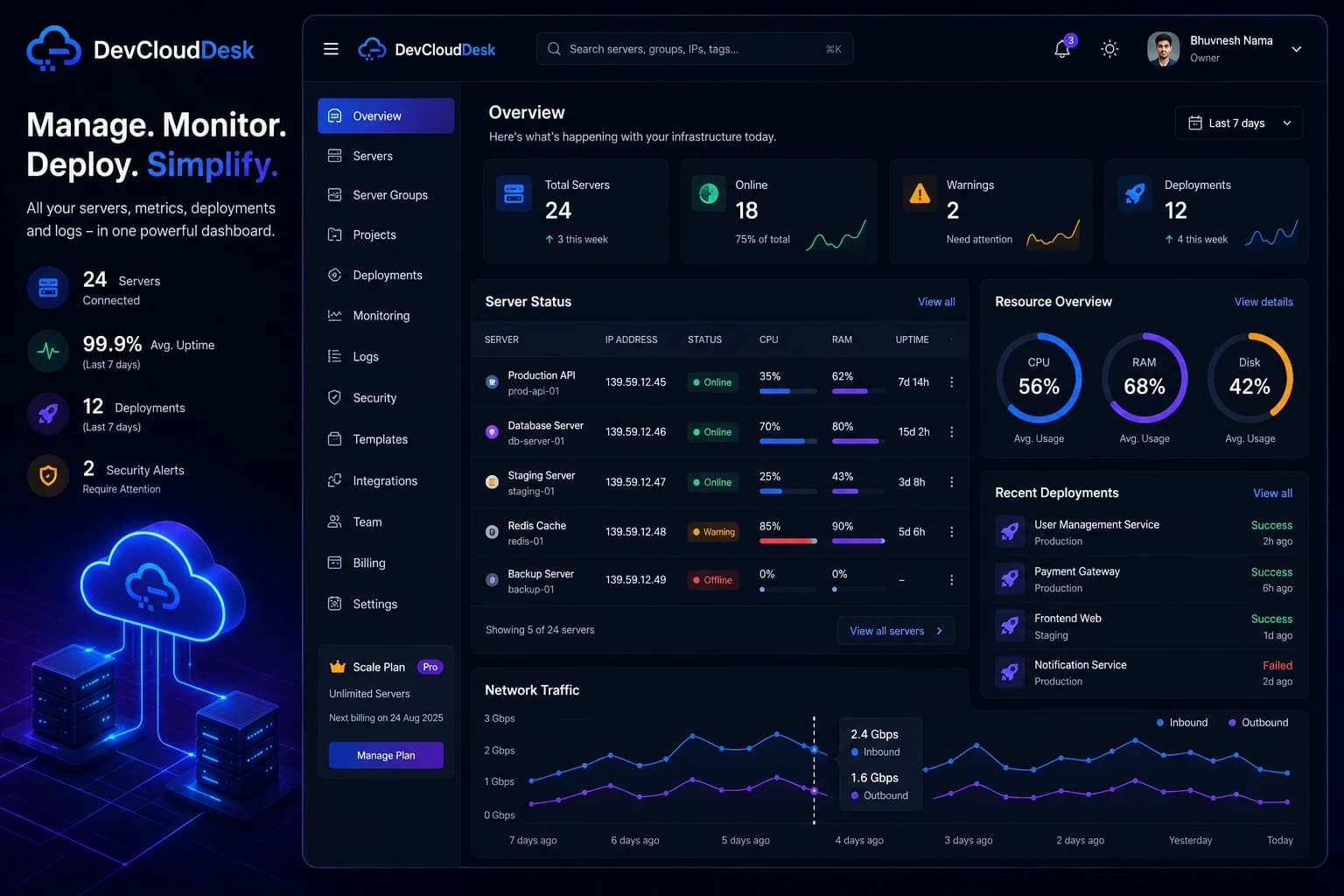
Control Every Server.
Right From Your Browser.

Stop SSHing blindly into unmonitored VPS clusters. Control web terminals, track sub-second telemetry, and deploy code in seconds with zero-trust security and complete audit trails.

No credit card required · Setup in minutes

Secure Operations
Real-time Monitoring
devclouddesk — secure session

The problem

Server work becomes a mess when it lives in your memory.

$ ssh user@prod-1 # what was the IP again?
$ ssh user@staging # wrong key...
Permission denied (publickey)
$ history | grep deploy # which command worked?
... 47 results found
$ top # server down? who restarted it?
  • Jumping between terminals
  • Remembering commands
  • No idea what's happening across servers

The solution

A dashboard that gives you control and visibility.

$ dcd connect production-web-01
✓ Connected via encrypted channel
$ dcd status
CPU: 12% │ Memory: 68% │ Uptime: 47d
$ dcd deploy --project api
✓ Deployed to 3 servers
  • One dashboard for all servers
  • Visual control with audit trails
  • Real-time insights and alerts

Systems Overview

Core capabilities

Everything your team needs to securely operate infrastructure and ship reliable deployments.

Secure Terminal Access

Authorized browser access with monitored, session-based controls.

Monitoring & alerts

CPU/RAM/disk, ports, top processes, and notifications.

SFTP file manager

Browse, upload, download, and manage server files.

Services & databases

Docker, Nginx, PM2, plus Postgres/MySQL/Mongo tools.

Deployments & automation

Projects, GitHub deploys, templates, and scheduled jobs.

Feature highlight

Work inside secure terminal sessions
with assistant context

Open authorized shell sessions from the browser, keep session context visible, and use the terminal assistant without leaving your operational workspace.

  • Start controlled terminal sessions for authorized servers
  • Keep assistant guidance beside the active shell
  • Share sessions through explicit access controls
terminal — secure session
LIVE
Secure terminal

Run authorized terminal sessions with a contextual assistant and share controls in the same view.

Interactive Control Center

Explore live operational workflows

Click through the core DevCloudDesk environments below to see how web terminals, process controls, live telemetry, and SFTP file management operate in real time.

Terminal Access

Browser-based shell with AI context & full audit logs

Launch authenticated terminal sessions directly from your browser without needing local key distribution or unmonitored SSH tunnels.

  • No local SSH client configuration required
  • Interactive command history & session tracking
  • Contextual AI terminal assistant built-in
  • Role-based authorization & security controls
Access Mode
Browser Terminal
Security
Role-Based Access
devclouddesk // terminal
Active Session

Mission Briefing

How it works

Register infrastructure, establish a secure session, then operate with visibility.

Register infrastructure

Step 1

Add authorized servers and map them by project or environment.

Establish secure session

Step 2

Use secure terminal access or agent-based access with policy controls.

Operate with visibility

Step 3

Manage secure terminal, monitoring, files, and services in one place.

Why manage servers with DevCloudDesk?

Direct terminal tools are useful, but teams need policy controls, audit trails, and centralized visibility.

Direct terminal workflow
DevCloudDesk
Ad-hoc terminal sessions
Controlled secure terminal access
Give authorized users a clear path into the servers they are allowed to manage.
Local command history
Centralized activity logs and access history
Keep operational history visible beyond a single machine or browser session.
Unclear access scope
Role-based access controls
Limit actions by user role, server ownership, and team responsibility.
Limited session visibility
Session metadata and live monitoring
See who is connected, what is active, and how server resources are behaving.
Manual operational risk
Auditable infrastructure workflows
Support safer reviews with traceable access and documented server activity.
Security vault

Security and compliance,
by design

Built for organizations that need secure, controlled, and monitored infrastructure operations.

  • Encrypted connections for web and agent channels
  • Session-based access with managed authorization
  • Activity logging for operational traceability
  • Access restrictions with role and policy controls
Encrypted
Connections
Session-Based
Access Control
Controlled
Permissions
Activity
Audit Logs
Compliance-first workflows

Keep operations consistent across production and staging, and maintain auditable change history for regulated environments.

Clear rules for safe operations

DevCloudDesk is for authorized infrastructure only, with abuse reporting, transactional email practices, and published operating policies.

Field Operations

Use cases

Secure workflows for teams operating real-world infrastructure.

Developers managing VPS

Run controlled deployments, service operations, and secure terminal tasks from one workspace.

Teams handling deployments

Use role-based controls, access history, and monitored workflows across environments.

Infrastructure monitoring

Track infrastructure health, alerts, and session activity with centralized visibility.

Compliance-focused operations

Maintain controlled access, activity logging, and clear operational history across environments.

DevOps Knowledge Base

Latest Guides & Insights

Operational notes, infrastructure security standards, and automated deployment tutorials.

Explore All Articles
How to Manage Multiple Servers From One Dashboard Without Complex DevOps Tools
Server Management
Server Management
DevOps
Cloud Infrastructure

How to Manage Multiple Servers From One Dashboard Without Complex DevOps Tools

Managing multiple servers can quickly become complicated when developers use separate tools for SSH access, monitoring, deployments, and security. Learn how modern server management platforms simplify infrastructure management by bringing everything into one centralized dashboard.

DevCloudDesk TeamJul 25, 20264 min read3 views
Read Article

Take full control of your servers
in just a few minutes

Secure terminal access, monitoring, logs, and service control in one unified DevOps platform.

No credit card required to start